

How to Open a Medspa in 2026: The IT, HIPAA & Security Setup Checklist
Most new medspas get the lasers and the lease right, then bolt on technology at the last minute. Here's the IT, HIPAA, and cybersecurity setup to plan from day one, in the order that actually works.
Opening a medspa is a race of permits, build-out, hiring, and marketing. Technology usually gets handled last, a booking app downloaded the week before opening, patient photos saved to someone's phone, a consumer router plugged in by the contractor. It works for about a month. Then you are a HIPAA-covered business running patient data on a setup that was never designed to protect it.
The good news: getting it right is not expensive or complicated if you sequence it correctly. This is the IT, HIPAA, and cybersecurity checklist we walk new medspa owners through, in the order that saves the most money and rework.
IT is a founding decision, not an afterthought
The moment you take a before-and-after photo, store a consent form, or tie a payment to a patient record, you are handling protected health information (PHI), and you are a HIPAA-covered entity. That status arrives on your first patient, not on some later date when you "get around to compliance." Building the right foundation before opening day is far cheaper than retrofitting it after an incident or a complaint.
It also protects the thing a medspa sells: trust. Patients hand you their face and their health history. A breach is not just a fine, it is the reason they never rebook. For the full picture on the rules, our guide to HIPAA compliance for medspas breaks down what the 2026 Security Rule changes.
The IT setup timeline, from lease to launch
Sequence matters. Each phase depends on the one before it, so doing them out of order is where new practices waste money. Here is the path we recommend.
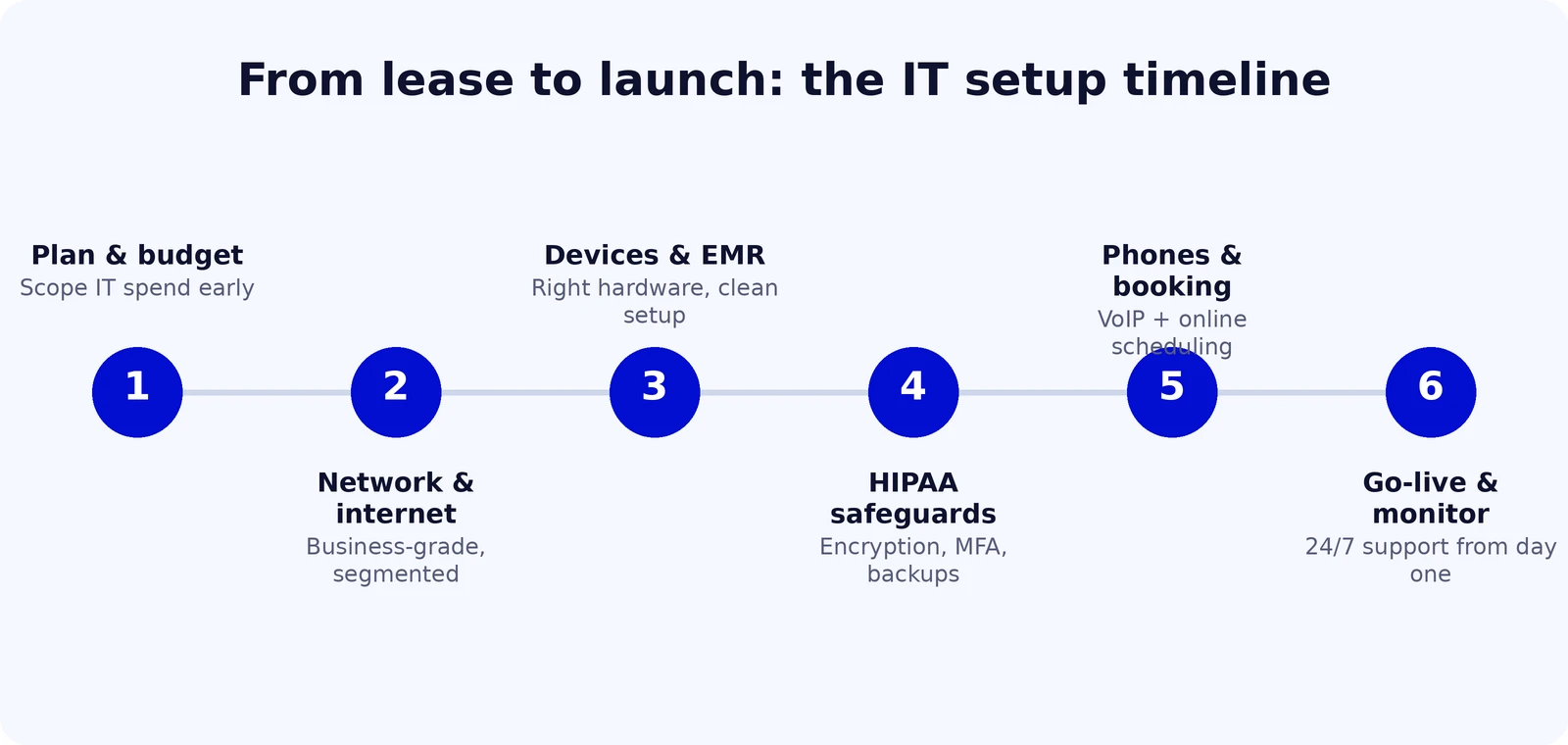
Your phase-by-phase setup checklist
1. Plan and budget your IT early
Before the build-out is finished, decide what your technology actually needs to do: how many treatment rooms, how many staff devices, what software you will run, and what your internet and phone needs are. Scoping IT during planning (not after) means cabling, access points, and power are in the right places before the walls close up.
2. Network and internet
Order a business-grade internet connection early, because install lead times can run weeks. Then design the network for security from the start: a business firewall, and separate networks (VLANs) for clinical devices, front desk, guest Wi-Fi, and smart devices like cameras and TVs. A flat network where the guest Wi-Fi can reach patient records is the single most common new-practice mistake.
3. Devices and your EMR
Choose business-class workstations and tablets that meet your software's requirements, and set them up cleanly with managed updates and disk encryption from the first boot. This is also when you select and configure your clinical software. If you are still weighing options, our breakdown of EMR vs. practice management vs. all-in-one covers how to choose, and our EHR / EMR IT support handles the setup and data flow.
4. HIPAA safeguards
With the network and devices in place, layer on the safeguards: encryption everywhere, multi-factor authentication on every system that touches PHI, unique logins (never a shared password), encrypted and immutable backups, and signed Business Associate Agreements with every vendor that handles patient data. Document a basic risk analysis and an incident-response plan. This is the heart of HIPAA compliance.
5. Phones and booking
A modern VoIP phone system gives you call routing, voicemail-to-email, and text, and it integrates with online booking so you stop losing after-hours inquiries. Set this up before launch so your number, reminders, and confirmations are live on opening day.
6. Go-live and ongoing monitoring
Opening day is not the finish line for IT, it is the start of monitoring. Endpoint protection, patching, backups, and security alerts need someone watching them continuously. Most new practices do not have an in-house IT person, which is exactly where managed IT earns its place: 24/7 monitoring and a helpdesk without a payroll hire.
A HIPAA-ready medspa tech stack
Put together, a compliant single-location medspa stack has six layers. None of them require an enterprise budget, but skipping any one of them is where the risk lives.
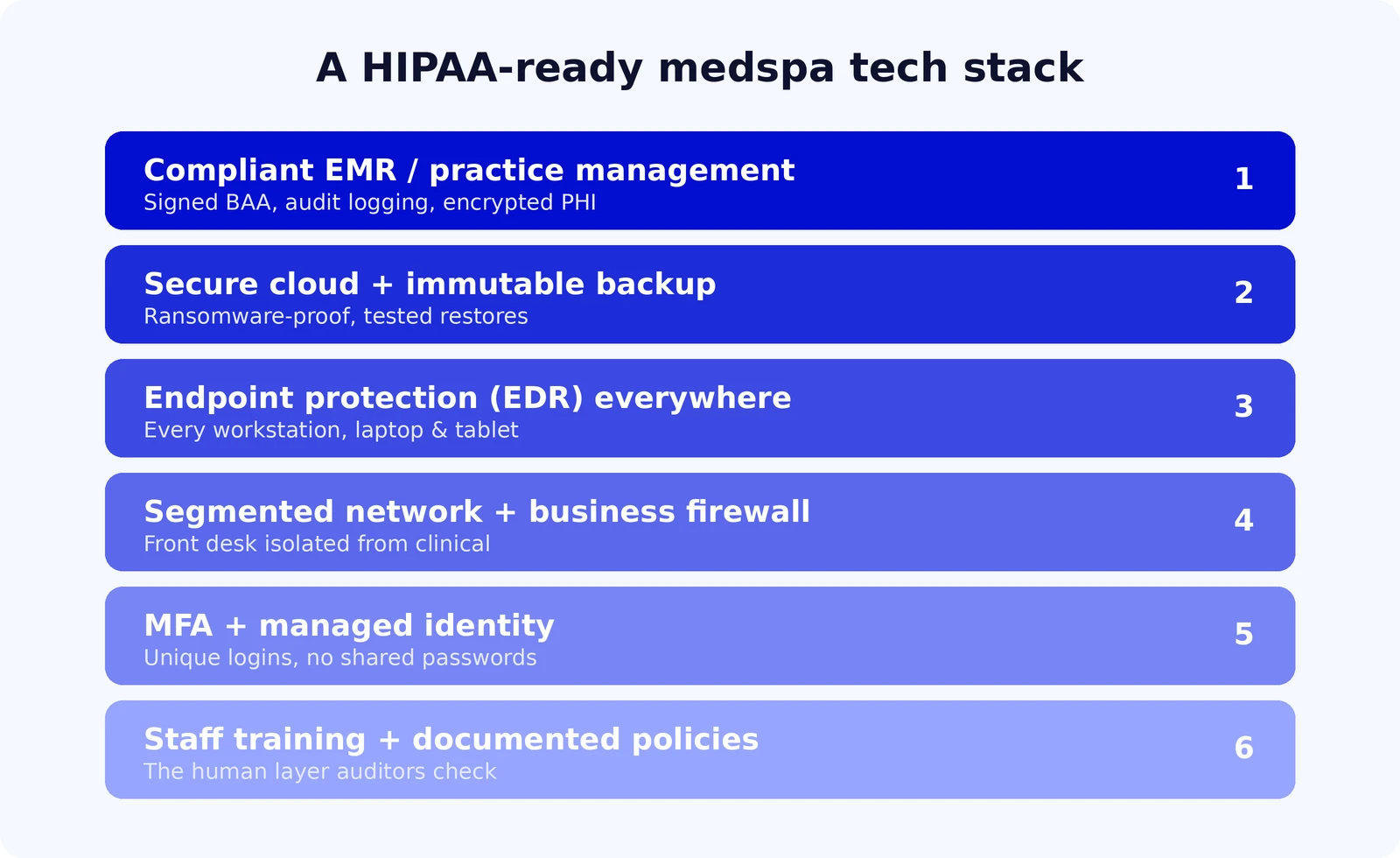
The fastest way to fail an audit is a vendor with no signed BAA. Your booking platform, EMR, payment processor, cloud storage, and marketing tool all touch patient data. If a vendor cannot produce a Business Associate Agreement, that is a hard stop, no matter how good the product looks. Cybersecurity and backup belong in the foundation too, see our cybersecurity and cloud and backup services.
What medspa IT actually costs to set up
Budgets vary with size and build-out, but for a single-location medspa the ranges are predictable. Software (EMR and practice management) typically runs from under $100 to several hundred dollars per month depending on depth. Managed IT and security is usually billed per user or per device each month, which keeps it a plan-able line item rather than a surprise. The expensive path is the reactive one: emergency fixes, a breach, or rebuilding a network you have to tear out because it was not designed for compliance.
The single best money-saver is sequencing. Decisions made during build-out cost a fraction of the same decisions made after opening, when every change touches live patient operations.
How ready is your setup? Take the 2-minute check
Whether you are opening soon or already running, this quick self-assessment scores where your IT and HIPAA posture stands and shows you what to fix first.
How healthy is your IT?
Answer 6 quick questions for an instant IT & HIPAA security score and a tailored list of what to fix. No email required.
Frequently asked questions
Is my medspa really covered by HIPAA?
If you create or store identifiable patient information (treatment notes, photos, medical history) or transmit health information electronically for billing or eligibility, you are almost certainly a covered entity. The safe assumption is yes, from your first patient.
When should I start on IT and HIPAA, before or after opening?
Before. Network cabling, device setup, and safeguards are dramatically cheaper to do during build-out than to retrofit on a live practice. Safeguards need to be in place on day one, because that is when PHI starts flowing.
Can I just use a consumer router and my personal phone to start?
It is the most common early mistake. A consumer router with a flat network and patient photos on a personal phone is a HIPAA violation waiting to be found. Business-grade network gear and a compliant device setup are not expensive, and they are the foundation everything else sits on.
Do I need in-house IT staff?
Most single-location medspas do not. Managed IT gives you 24/7 monitoring, helpdesk, patching, and security for a predictable monthly fee, which is far less than a full-time hire and more coverage than one person can provide.
What does the IT setup actually cost?
Software and managed IT are typically monthly per-user or per-device costs that scale with your size, so they stay predictable. The unpredictable costs come from skipping the foundation: emergency support, breach response, or rebuilding a non-compliant network later.
Opening a medspa? Start the IT and HIPAA setup right.
Atlantic Computer Systems helps new and growing medspas plan, build, and secure the network, devices, phones, and HIPAA safeguards your practice runs on, so you open with compliance handled and nothing to retrofit.